Bonuses linked to a work entry
Add a bonus linked to the work it relates to. It is included in the calculation alongside the hours and rate.
Bring working time, rates, overtime and bonuses together. See where each amount comes from and prepare a summary for further payroll processing.
A snapshot of the calculation shown in the summary below.
Hours and calculated amounts for your selected period.
Rates, overtime thresholds and multipliers.
From the total to its individual components.
Choose a period and review each person’s hours and calculated amount. When you need an explanation, open the details of their pay calculation.
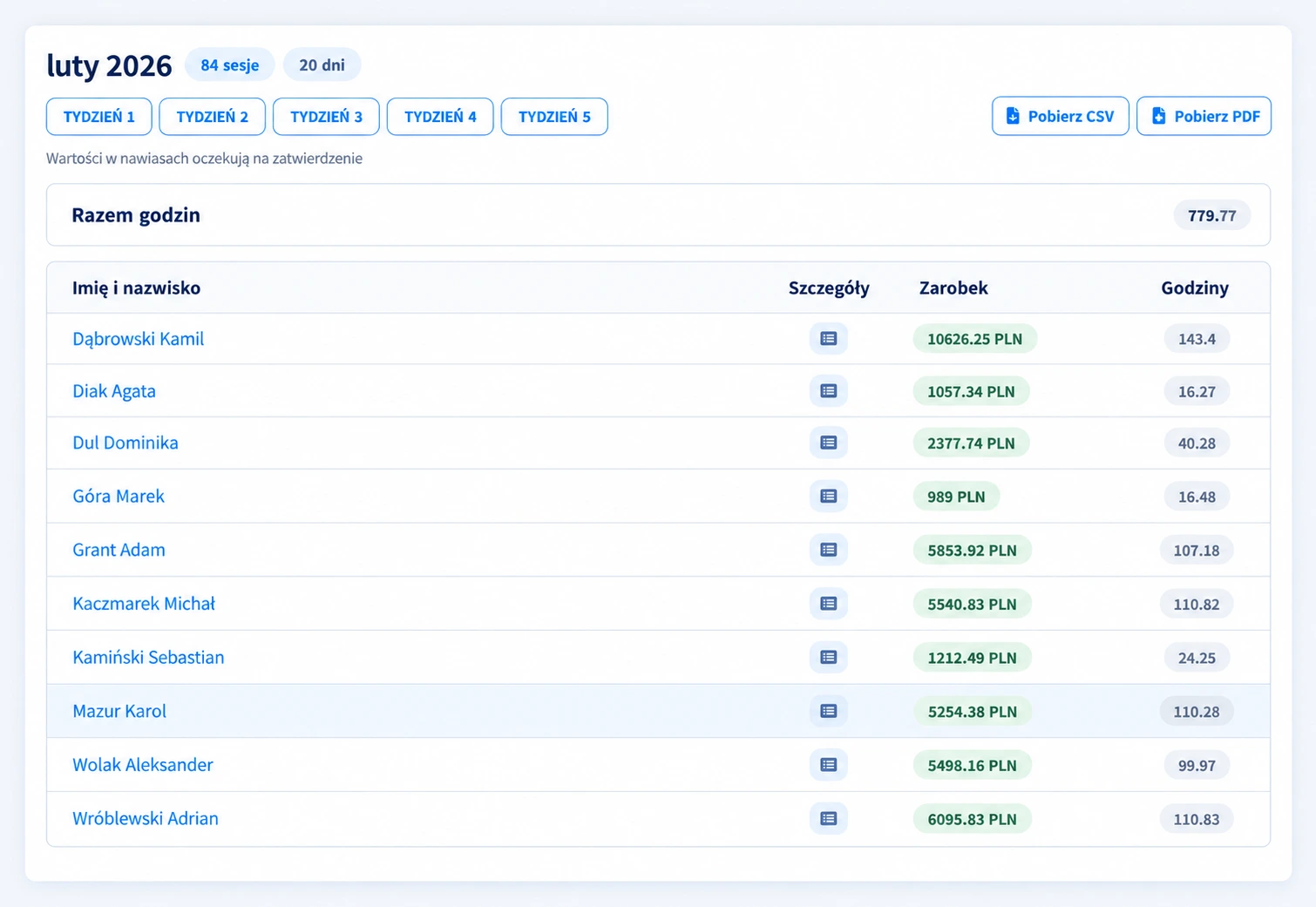
Scroll the image to view individual rows and columns.
A monthly summary with links to individual weeks makes the data easier to review.
Values awaiting approval are shown in brackets.
Hours and calculated earnings stay together, with access to each employee’s details.
See the breakdown: time category, hours, rate, multiplier and bonus. It is easier to explain the result and find an item that needs correcting.
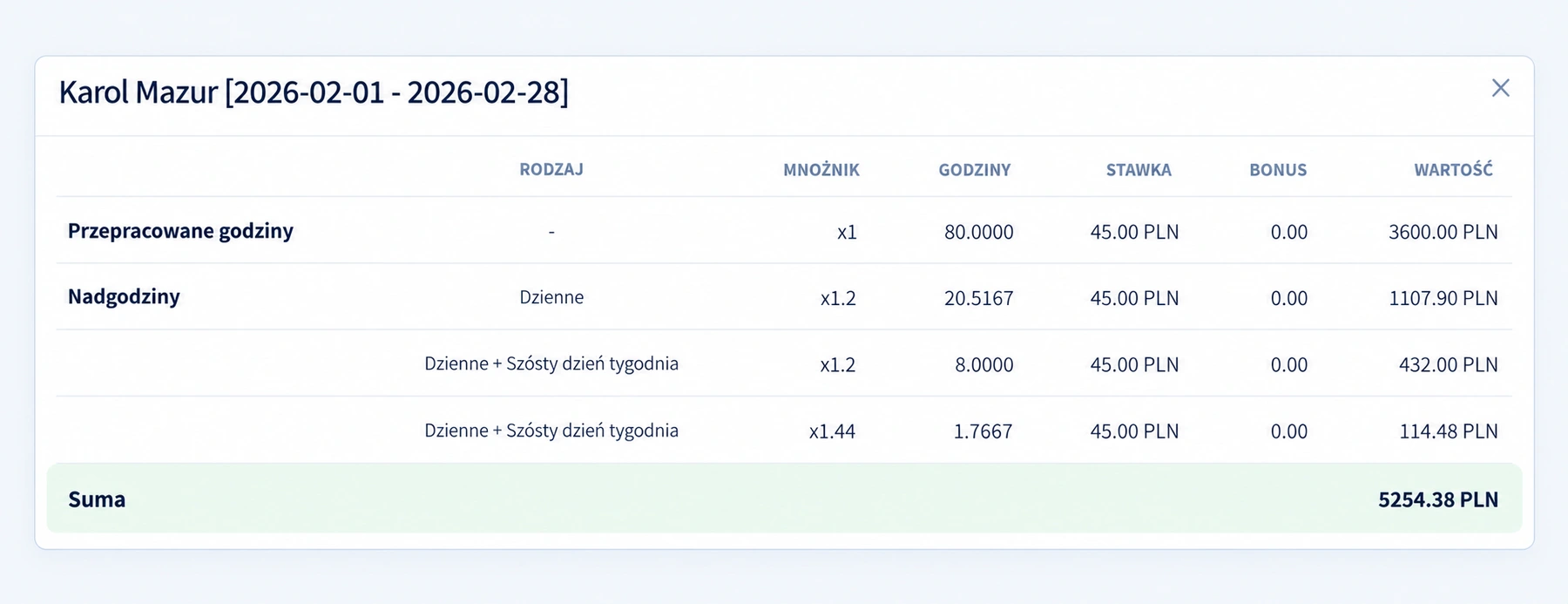
Scroll the image to read hours, rates and amounts.
The base calculation is shown separately from overtime and additional components.
Separate rows show which rules contributed to the calculated amount.
Each component has a value, and together they form the total for the period.
Enable the rules you need, then set hour thresholds and rate multipliers. The calculation shows regular time and overtime based on your settings.
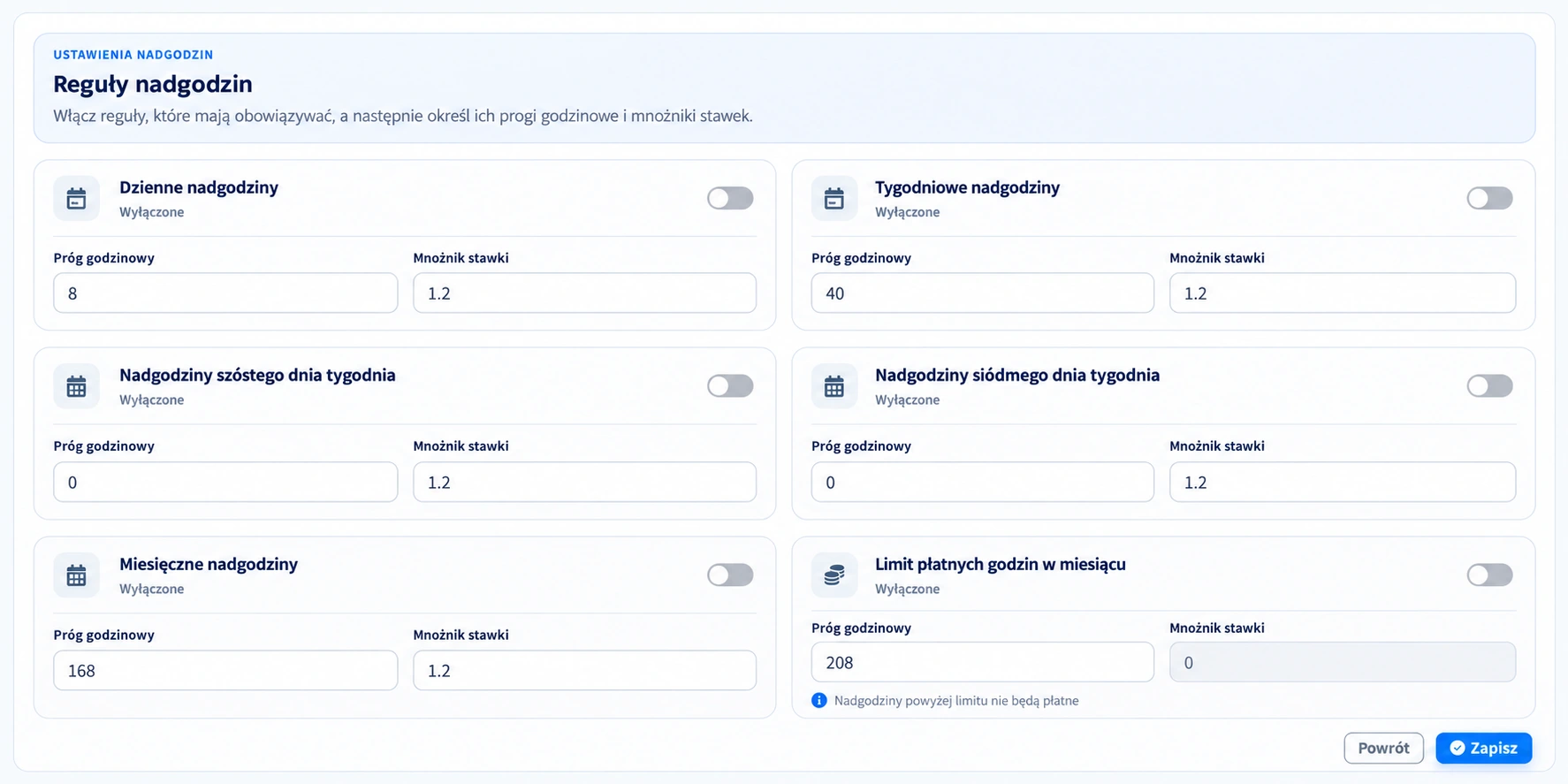
Scroll the image to read the individual rules and parameters.
Not every job has the same rate. Keep pay and adjustment information with the recorded work period.
Add a bonus linked to the work it relates to. It is included in the calculation alongside the hours and rate.
A negative item can reduce the calculated amount. Keep a clear breakdown of the components for review.
Apply the appropriate hourly rate. Amounts in different currencies are displayed separately.
Review work entries, breaks and corrections. Approve the data that will form the basis of the calculation.
Review rates, overtime and adjustments. The details help explain differences in the calculation.
Export the data as CSV or PDF and pass it on for further processing in your company.
Use CSV to work with the data. PDF gives you a readable summary of the selected period.
Open a sample breakdownDecide who can add bonuses and who can view earnings. Access depends on roles and assigned permissions.
Key information about rates, adjustments and working with the summary.
It is based on working hours and the assigned rate. CrewTango also includes configured overtime rules, plus bonuses and deductions linked to work entries.
Daily, weekly, sixth-day, seventh-day and monthly rules are available. You can set thresholds, multipliers and a monthly paid-hours limit.
They are values awaiting approval. This makes it possible to distinguish data that still needs approval in the summary.
Yes. A positive or negative item can be linked to a recorded work period. Permission to add bonuses depends on the assigned access rights.
Access to pay and earnings information depends on the roles and permissions configured in your company. You can restrict access to this information.
Yes. The rate and currency are linked to the work, and summaries separate amounts by currency.
You can export the summary as CSV or PDF for further processing in your company or to share with the person responsible for payroll.
It is an amount calculated from working time, rates and adjustments configured in CrewTango. It provides a basis for further payroll processing; it does not calculate taxes or social contributions.
Bring hours, rates and adjustments into one process — with a full view of the calculation breakdown.